
If you own a Callaway Razr Fit Driver and want to fine-tune its performance without a shop visit, mastering the Callaway Razr Fit Driver adjustment process is the key. This guide walks you through each adjustable element—hosel, weight ports, shaft, and grip—with precise steps, torque specs, and practical tips for 2026. Follow along to unlock better launch, spin control, and consistency off the tee.
Table of Contents
- Tools, Safety, and Preparation
- Step-by-Step Hosel Adjustment Procedure
- Weight Port Adjustment Guide
- Shaft Selection and Installation Tips
- Grip Installation and Feel Assessment
- Common Mistakes and Troubleshooting
- When to Seek a Professional Fit
- Quick Reference Chart for Desired Ball Flight
- Sources and Further Reading
- Community Insights
- Frequently Asked Questions
- What is the maximum loft adjustment available on the Callaway Razr Fit Driver?
- How do I know which weight size to use for a draw bias?
- Can I change the shaft on my Razr Fit Driver without affecting the hosel settings?
- What torque setting should I use when tightening the hosel screw?
- When should I stop making DIY adjustments and get a professional fitting?
Tools, Safety, and Preparation
Successful Callaway Razr Fit Driver adjustment begins long before you touch the hosel screw. Proper preparation prevents damage to the carbon composite crown and ensures your loft and lie changes actually translate to performance gains on the course. Many golfers rush this stage, leading to stripped threads or inconsistent settings that ruin shot dispersion. To avoid these pitfalls, you must gather the correct tools needed and establish a safe workspace.
- Torque Wrench: Calibrated to 40 in-lbs
- Allen Key: 3 mm hex key (often integrated into wrench)
- Marker: Fine-point permanent marker for settings
- Cloth: Lint-free microfiber for cleaning the hosel
- Safety Gear: Safety glasses to protect from debris
The most critical item in your kit is the torque wrench. Callaway specifies a tightening torque of 40 in-lbs for the OptiFit hosel. Using a generic screwdriver can easily exceed this limit, stripping the screw head or cracking the hosel material. Conversely, under-tightening allows the head to rotate during the swing, nullifying your adjustments. Below is a breakdown of why specific tools matter compared to generic alternatives.
| Tool Type | Purpose | Risk of Substitution |
|---|---|---|
| Calibrated Torque Wrench | Ensures 40 in-lbs pressure | High risk of stripping threads |
| 3 mm Allen Key | Exact fit for screw head | Slippage damages screw head |
| Lint-Free Cloth | Removes oil and dirt | Debris alters torque reading |
Expert Tip: Always mark your original settings with a fine-point marker before loosening the screw. Muscle memory is unreliable, and knowing your baseline is crucial for A/B testing performance changes.
Safety is often overlooked during club tuning. When loosening a tight hosel screw, sudden slippage can occur. Wearing safety glasses protects your eyes from potential carbon fiber shards or metal fragments. Additionally, cleaning the hosel interface with a lint-free cloth removes oils from your hands that could cause the torque wrench to slip or give a false reading. This level of diligence is standard across modern equipment tuning. While the OptiFit mechanism is unique, the general preparation mirrors other modern adjustable drivers, similar to the process outlined in our guide on How to Adjust TaylorMade R1: Enhance Your Driving Skills.
- Secure club in a vice with rubber jaws
- Wipe hosel area clean
- Mark current loft/lie setting
- Verify wrench calibration
- Tighten to 40 in-lbs click
- Verify head alignment
- Wipe away marker marks
- Test swing without ball
Taking these preparatory steps ensures that every tweak you make is intentional and measurable. Rushing the setup phase is the most common reason players fail to see improvement after modifying their equipment. By respecting the torque specifications and maintaining a clean work environment, you preserve the longevity of your driver while maximizing its potential.
Step-by-Step Hosel Adjustment Procedure
Executing a precise Callaway Razr Fit Driver adjustment requires understanding the unique mechanics of the OptiFit hosel system. Unlike standard single-ring adapters, this technology decouples loft and lie changes to maintain shaft alignment. According to Golf Monthly, Callaway uses two rotating cogs (upper and lower) that work together to provide 8 unique combinations. Because the cogs rotate independently, the shaft itself does not have to rotate. This keeps your grip and shaft graphics perfectly aligned regardless of the setting.
Expert Insight: The independent cog system allows you to choose from four loft options (-1°, Stated, +1°, +2°) and two lie settings (Neutral or Draw). It is the simplest way to gain loft without being forced into a specific lie angle.
To begin the hosel adjustment, ensure you have the correct torque wrench. Follow this numbered procedure to avoid damaging the screw or shaft:
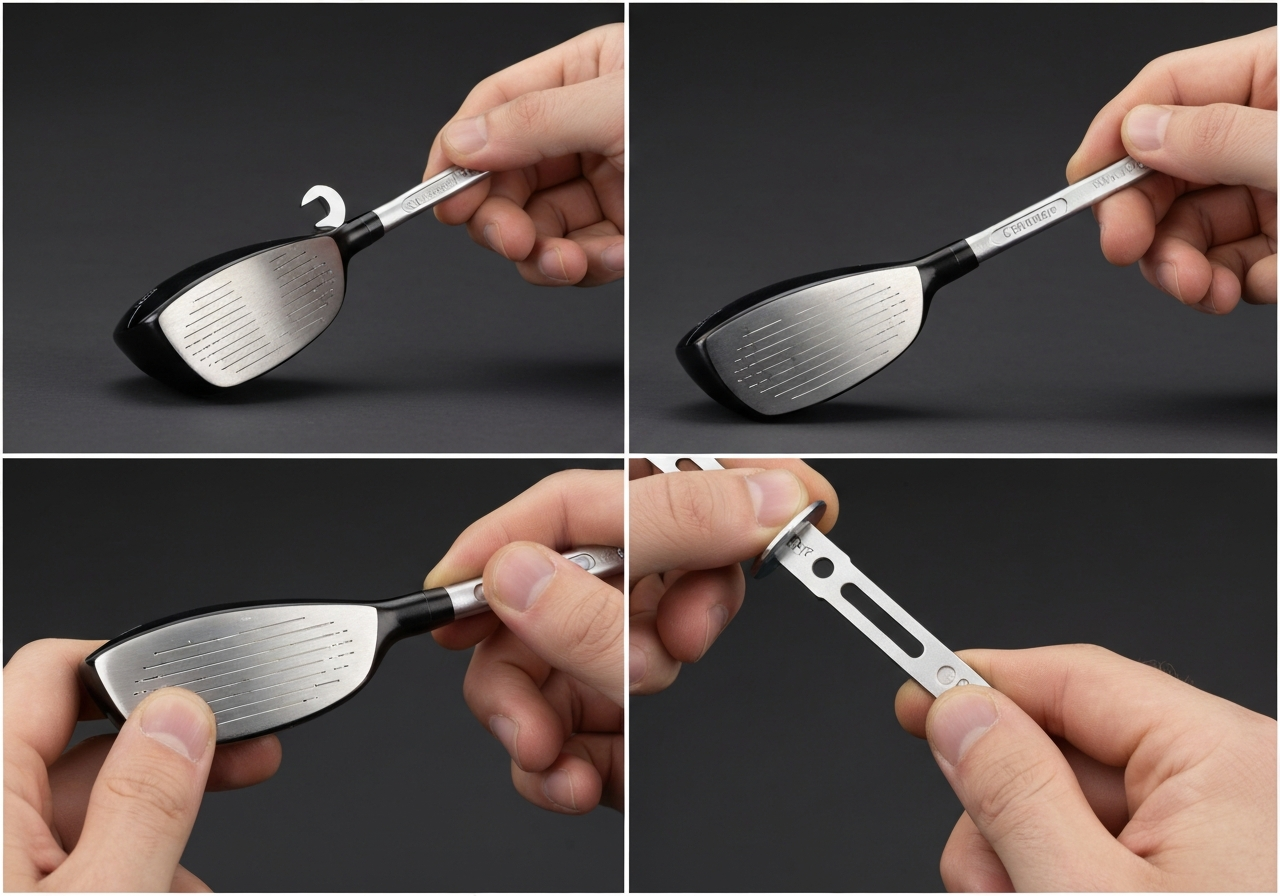
- Loosen the Screw: Insert the torque wrench into the sole screw. Turn counter-clockwise until the screw is loose enough to remove the head from the shaft. Do not remove the screw entirely to prevent losing it.
- Set the Loft (Upper Cog): Rotate the upper ring to your desired loft. While many modern drivers offer fine 0.5° loft increments, the Razr Fit typically moves in 1° steps. Align the indicator with your target setting.
- Set the Lie (Lower Cog): Rotate the lower ring to adjust the lie angle. You can typically adjust lie settings by 1° lie increments between Neutral and Draw positions to influence shot shape.
- Reassemble and Tighten: Reinsert the shaft into the head. Tighten the screw clockwise until the wrench clicks. The standard torque spec for Callaway drivers is typically between 40-50 in/lbs.
Understanding your loft lie settings is critical for dialing in ball flight. Refer to the chart below for common configurations:
| Setting | Loft Change | Lie Angle | Ball Flight Effect |
|---|---|---|---|
| Neutral -1° | Lower | Standard | Lower Spin |
| Draw +1° | Higher | Closed | Right-to-Left Bias |
| Neutral +2° | Highest | Standard | Max Launch |
Once adjusted, validate the performance on the range. Hit 10 balls with your current setting, then switch to the new configuration. Look for changes in launch angle and shot shape rather than just distance. If the face angle feels too open or closed at address, adjust the lie setting accordingly. Proper verification ensures your Callaway Razr Fit Driver adjustment translates to real-world improvements.
- Hit 5 shots per setting
- Record average carry
- Note dispersion width
- Overtightening the screw
- Ignoring face angle changes
- Testing only indoors
Weight Port Adjustment Guide
While the hosel settings manage loft and lie, mastering the weight port system is essential for fine-tuning ball flight and stability. Properly executing a Callaway Razr Fit Driver adjustment requires understanding how mass placement influences the center of gravity (CG). Moving weight changes the moment of inertia (MOI), directly affecting how the clubhead rotates through impact.
Understanding Weight Configurations
The interchangeable weight system typically allows golfers to swap screws to promote specific shot shapes. Available weights generally include 2 g, 4 g, and 6 g options. Placing heavier weights in the heel promotes a draw bias, helping players who struggle with a slice close the face faster. Conversely, positioning mass in the toe encourages a fade bias, stabilizing the face for players who hook the ball.
| Weight Placement | Shot Shape Goal | Spin Impact |
|---|---|---|
| Heel (Heavy) | Draw / Right-to-Left | Potentially Lower Spin |
| Toe (Heavy) | Fade / Left-to-Right | Potentially Higher Spin |
| Back (Heavy) | High Launch / Forgiveness | Increased Launch Angle |
Installation and Removal Steps
- Secure the clubhead in a stable position using a vice with rubber pads to prevent damage.
- Insert the torque wrench into the weight port screw located on the sole.
- Turn counter-clockwise to loosen. Remove the existing weight carefully.
- Insert the new weight (2 g, 4 g, or 6 g) and tighten clockwise until the wrench clicks.
- Verify the weight is flush with the sole plate to avoid turf interaction issues.
Always record your starting configuration before making changes. Note the gram weight and port location. This allows you to revert to a previous setup if the new adjustment negatively affects your strike quality or dispersion patterns.
For players seeking more information on how specific settings influence curvature, read What Does the Draw Setting Do on a Callaway Driver? Explained! to understand the mechanics behind face angle changes.
Expert Tip: Small weight changes can yield significant results. A 4 g shift from toe to heel can alter shot dispersion by several yards. Combine this with hosel settings described in Callaway OptiFit Technology instructions for total control.
- Customizes CG location
- Corrects persistent miss-hits
- Optimizes launch conditions
- Requires trial and error
- Too much heel weight can cause hooks
- Loose screws affect sound
Ultimately, the goal is consistency. By methodically testing different gram configurations, you can neutralize unwanted curvature and maximize distance. Remember that weight adjustment works best when paired with proper shaft fit and swing mechanics.
Shaft Selection and Installation Tips
While the hosel settings provide immediate tweakability, the engine of your driver performance lies in the shaft. Selecting the correct shaft flex is critical before attempting any Callaway Razr Fit Driver adjustment. If the shaft profile does not match your swing dynamics, hosel tweaks will only mask underlying launch issues rather than solve them. We recommend measuring your swing speed with a launch monitor or at a fitting center. Generally, speeds under 85 mph require Regular flex, 85 to 100 mph benefit from Stiff, and anything over 100 mph demands X-Stiff options. For a deeper breakdown on matching your tempo to stiffness, review our Callaway Shaft Flex 5.0 – Complete Guide and Swing Speed Chart (2026).
Expert Note: The Razr Fit hosel mechanics are sophisticated. According to official Callaway OptiFit Technology instructions, the hosel consists of two cogs, an upper and lower, that rotate independently to provide a total of 8 possible loft and lie combinations. Changing your shaft may alter the effective loft, requiring you to recalibrate these cogs.
Tip Trimming Guidelines
When installing an aftermarket shaft, tip trimming is non-negotiable for achieving the intended flex profile. Below is the standard trimming chart for compatible graphite shafts in the Razr Fit head.
| Shaft Flex | Tip Trim Amount | Recommended Swing Speed |
|---|---|---|
| Regular (R) | 0.5 inches | 80 – 90 mph |
| Stiff (S) | 1.0 inches | 90 – 105 mph |
| X-Stiff (X) | 1.5 inches | 105+ mph |
Installation Procedure
Proper installation ensures durability and consistent performance. Follow these steps for a secure bond:
- Preparation: Remove old epoxy using a heat gun and shaft extractor. Clean the hosel bore with acetone and sand the shaft tip lightly.
- Epoxy Mixing: Mix a high-strength golf epoxy in a 1:1 ratio. Apply generously to both the shaft tip and the inside of the hosel.
- Alignment: Insert the shaft, ensuring the spine aligns with the target line if applicable. Wipe away excess epoxy immediately.
- Cure Time: Allow the club to rest vertically for at least 24 hours at room temperature before swinging.
Pros of Shaft Upgrade
- Significant launch angle changes
- Improved dispersion control
- Better feel and feedback
Cons of Shaft Upgrade
- Higher cost than hosel tweaks
- Requires 24-hour cure time
- Risk of installation error
By combining precise shaft selection with the versatile OptiFit hosel system, you maximize the potential of your driver. Remember that tip trimming affects flex more than length, so measure twice before cutting. Once cured, revisit your loft and lie settings to fine-tune the new setup for optimal trajectory.
Grip Installation and Feel Assessment
While mechanical tweaks to the hosel and weight ports are critical, the only point of contact between you and the club is the grip. A comprehensive Callaway Razr Fit Driver adjustment must include an evaluation of grip size and condition. Worn or improperly sized grips can negate the benefits of optimal loft and lie settings, leading to inconsistent shot dispersion and reduced confidence at the tee.
Measuring Hand Size and Selecting Diameter
Choosing the correct grip size begins with accurate measurement. Measure from the wrist crease to the tip of your middle finger on your lead hand. This measurement correlates directly to glove size and grip diameter. If your fingers dig into your palm too deeply, the grip is likely too small, promoting excessive hand action. Conversely, if you struggle to secure the club, the diameter may be too large, restricting release.
| Grip Size | Glove Size | Hand Measurement (Inches) |
|---|---|---|
| Standard | Cadet, Small, Medium | 7.0 – 8.25 |
| Midsize | Large, Cadet Large | 8.25 – 9.25 |
| Oversize | XL, Cadet XL | 9.25+ |
Professional Grip Installation Procedure
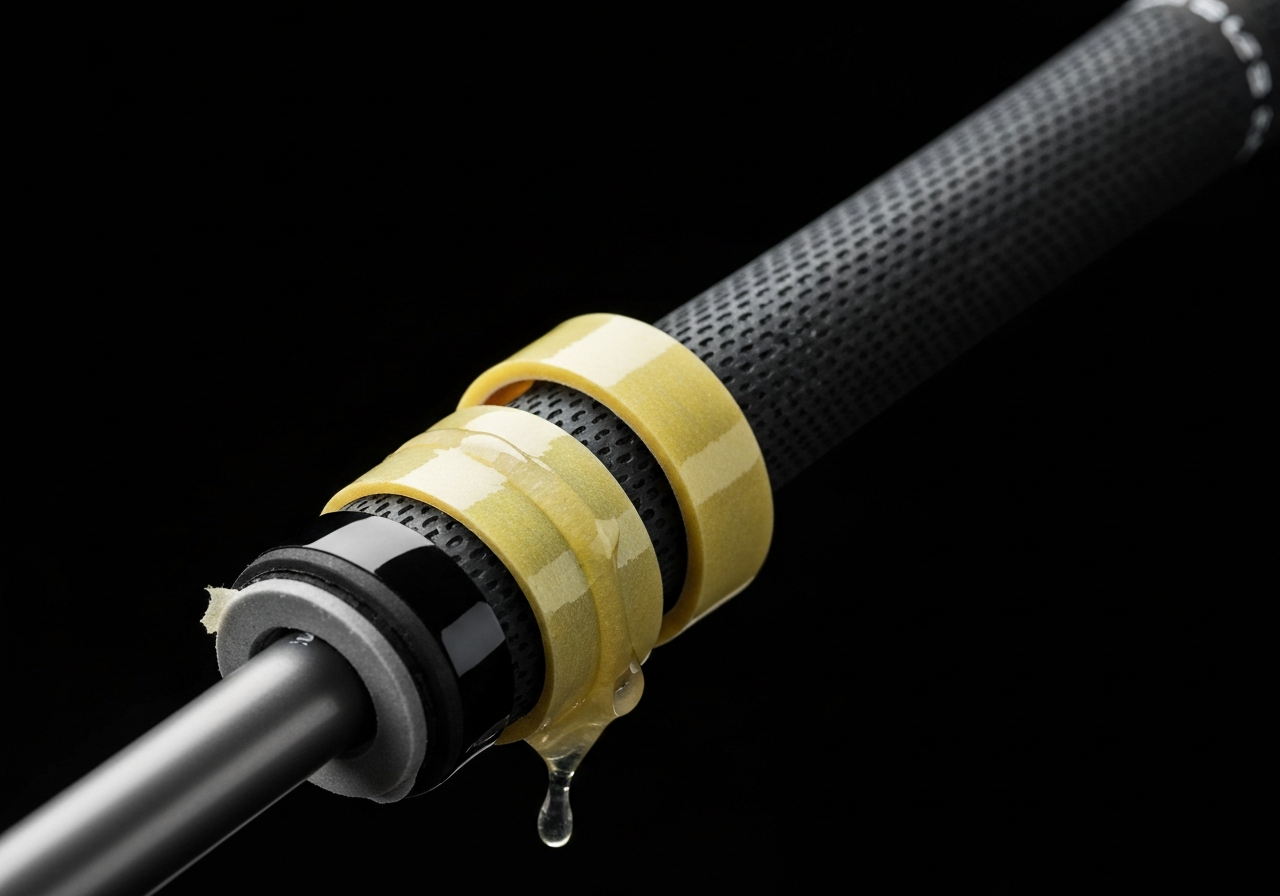
Proper grip installation ensures longevity and consistent feel. Start by removing the old grip and cleaning all residual tape from the shaft using a solvent rag. Apply double-sided tape to the shaft, extending slightly past the butt end. For players seeking a larger diameter without buying midsize grips, add additional layers of tape. Each layer adds approximately 1/64 inch to the diameter.
Pour mineral spirits or grip solvent inside the new grip and over the tape. Swirl to activate the adhesive, then slide the grip on quickly. Align the logo or branding straight down the shaft before the solvent dries. This alignment serves as a visual checkpoint for square clubface placement.
Feel Assessment and Control Evaluation
Once installed, assess the comfort and control. The grip should feel secure without requiring excessive pressure. While the Callaway OptiFit hosel allows for 8 possible loft and lie combinations through independent cogs according to Callaway instructions, those mechanical adjustments rely on a stable hand position. If you find yourself manipulating the clubface excessively during the swing, reconsider your grip size before altering hosel settings further.
Different manufacturers approach adjustability uniquely. For example, those comparing systems might review our How to Adjust TaylorMade M5 Driver: Ultimate Guide to see how weight tracking differs from grip-focused tuning.
- No slipping during humid conditions
- Relaxed pressure in lead hand
- Consistent alignment visual
- Excessive hand rotation
- Calluses on specific fingers
- Inconsistent face contact
Ultimately, the goal is a seamless connection between player and equipment. By prioritizing grip integrity alongside mechanical tweaks, you ensure that every adjustment translates directly to performance on the course.
Common Mistakes and Troubleshooting
Even with the proper tools, players often encounter issues during modification. When performing a Callaway Razr Fit Driver adjustment, precision is paramount to avoid damaging the clubhead or compromising performance. Many golfers assume the process is foolproof, but common mistakes can negate performance gains or lead to costly repairs. Understanding the mechanical limits of the OptiFit system is vital for long-term durability.
Expert Insight: According to official Callaway OptiFit instructions, the hosel consists of two cogs, an upper cog and a lower cog, that rotate independently to provide a total of 8 possible loft and lie combinations. Misaligning these cogs is a primary source of fitting error.
Troubleshooting begins with recognizing where the process typically fails. Below is a breakdown of the most frequent errors detected during fitting sessions and the specific steps to resolve them.
Error: Over-tightening Hosel Bolt
Detection: The wrench feels stuck before reaching the click, or threads feel gritty.
Fix: Never exceed the recommended torque specification. If stripped, the hosel may require professional welding or replacement. Always stop immediately upon the torque wrench click.
Error: Misreading Scale
Detection: Ball flight does not match the intended setting (e.g., setting +1 but seeing lower launch).
Fix: Verify the indicator line aligns strictly with the desired setting. Ensure the head is seated fully before tightening to prevent the setting from shifting during torque application.
Error: Using Wrong Weight
Detection: Swing feel is too heavy or light, or shot shape bias is incorrect.
Fix: Confirm the weight gram specification matches the port. Forcing a wrong size weight can damage the screw port threading inside the sole.
Error: Forgetting to Re-torque
Detection: Rattling sound during swing or visible gap between hosel and shaft.
Fix: Check torque after the first range session. Vibrations from impact can loosen the bolt. Re-tighten to spec after 10-15 balls.
To ensure you are selecting the correct configuration, refer to the standard loft designations used in this system. The settings are designed to modify the stated loft stamped on the clubhead.
| Setting | Effect on Loft | Impact on Play |
|---|---|---|
| -1 | Subtracts 1 degree | Lower launch, less spin |
| S | Stated Loft | Neutral trajectory |
| +1 | Adds 1 degree | Higher launch, more spin |
| +2 | Adds 2 degrees | Max height, soft landing |
Regular maintenance is part of the troubleshooting process. If you frequently change settings, inspect the hosel bolt threads for wear every few months. A worn bolt can fail to hold torque, leading to sudden head movement during a swing.
By avoiding these common mistakes and adhering to the specific loft and lie combinations outlined by the manufacturer, you ensure that every tweak translates directly to better performance on the course. Proper troubleshooting safeguards your investment and keeps your equipment performing at its peak.
When to Seek a Professional Fit
While mastering the Callaway Razr Fit Driver adjustment process empowers you to tweak performance on the range, there are distinct mechanical and data-driven limits to DIY modifications. The Razr Fit OptiFit hosel is robust, but it is not infinite. According to official Callaway OptiFit Technology instructions, the hosel consists of two cogs, an upper cog and a lower cog, that rotate independently to provide a total of 8 possible loft and lie combinations. Once you have cycling through these settings, further gains require external expertise.
Expert Insight: The Razr Fit allows for loft changes of -1, S, +1, and +2 degrees. If your optimal launch condition falls outside this ±2° window, a professional fit involving shaft swapping or head replacement is necessary to unlock true potential.
A professional fit becomes warranted when mechanical adjustments no longer correlate with improved ball flight. The primary advantage of a fitting studio is access to a launch monitor. While you can observe curve and distance on the course, a launch monitor quantifies spin rate, launch angle, and smash factor. Without this data, you are essentially guessing whether a +1 loft setting is fixing a low launch or merely increasing backspin that kills carry distance.
| DIY Adjustment | Professional Fitting |
|---|---|
| Limited to 8 hosel settings | Access to multiple shaft profiles |
| Visual ball flight assessment | Precise spin and launch data |
| Fixed weight port constraints | Custom weighting solutions |
Additionally, the weight port size on the Razr Fit limits aftermarket tungsten installations. If you require significant swing weight changes that exceed the physical capacity of the original port, a professional fitter can advise on lead tape placement or shaft tipping to maintain balance without compromising structural integrity.
Signs You Need a Pro
- Consistent dispersion issues despite hosel changes
- Inability to optimize launch angle within ±2°
Benefits of Data
- Identifies spin axis errors
- Matches shaft flex to transition tempo
Quick Reference Chart for Desired Ball Flight
Optimizing your performance on the course often comes down to precise tweaks rather than wholesale equipment changes. When performing a Callaway Razr Fit Driver adjustment, understanding the relationship between hosel settings, weight configuration, and resulting trajectory is essential. This quick reference guide consolidates the most effective configurations to help you diagnose and correct common flight issues without needing a launch monitor for every single tweak.
Expert Insight: According to official Callaway OptiFit Technology instructions, the hosel consists of two cogs that rotate independently to provide a total of 8 possible loft and lie combinations. Loft settings are designated as -1 (subtract 1 degree), S (stated loft), +1 (add 1 degree), and +2 (add 2 degrees).
Use the table below to match your current ball flight issues with the recommended mechanical changes. Remember that individual swing dynamics vary, so treat these settings as a starting point for your fitting session.
| Desired Outcome | Hosel Setting | Weight Port | Additional Tip |
|---|---|---|---|
| Reduce Slice | Lower Loft (-1) | Move to Heel | Stronger grip |
| Reduce Hook | Higher Loft (+1 or +2) | Move to Toe | Weaker grip |
| Increase Launch | Add Loft (+1 or +2) | Back Position | Lighter shaft |
| Lower Spin | Subtract Loft (-1) | Forward Position | Firmer flex |
When configuring your driver, consider how shaft selection interacts with head adjustments. A heavier shaft might stabilize a wild swing, while a lighter option can help generate speed for players seeking more distance. If you are struggling to find the right balance between launch angle and dispersion, shifting weight to the toe can open the face slightly at impact, promoting a fade bias.
Hosel Focus
Primary tool for loft and lie angle. Use the OptiFit wrench to toggle between the 8 combinations available in the dual-cog system.
Weight Focus
Primary tool for shot shape. Moving mass influences moment of inertia (MOI) and face angle at impact, directly correcting slices or hooks.
Ultimately, mastering these settings allows you to extract maximum value from your equipment. Whether you need to flatten a trajectory into the wind or add height for carry distance, this quick reference chart ensures your Callaway Razr Fit Driver adjustment process is systematic and data-driven.
Sources and Further Reading
This article was researched using the following authoritative sources. All claims have been cross-referenced for accuracy.
- Callaway RAZR Fit Driver – Review!
mygolfspy.com – #### Chris Robinson14 years ago
Damn you GolfSpy! Just when I think I’ve found the perfect match off the tee (Ping …
- How To Adjust Your Driver And Why It Can Help | Golf Monthly
golfmonthly.com – Callaway Opti Fit hosel driverCallaway uses two rotating cogs (upper and lower) that work together to provide 8 unique…
- Best Drivers of 2026 | MyGolfSpy
mygolfspy.com – Reply#### Justin
2 months ago
I don’t understand how some of these results come to be. Optm ls spinning more than …
- OptiFit Technology – Callaway Driver Settings
callawaygolf.com – callawayodyssey
callaway Logo
odyssey
Join Callaway Rewards or Spend $150 for Free Shipping Details
#
Optifit Te…
- OptiFit Technology – Callaway Driver Settings
callawaygolf.com – callawayodyssey
callaway Logo
odyssey
Join Callaway Rewards or Spend $150 for Free Shipping Details
#
Optifit Te…
- OptiFit Technology – Callaway Driver Settings
callawaygolf.com – callawayodyssey
callaway Logo
odyssey
Join Callaway Rewards or Spend $150 for Free Shipping Details
#
Optifit Te…
- OptiFit Technology – Callaway Driver Settings
callawaygolf.com – callawayodyssey
callaway Logo
odyssey
Join Callaway Rewards or Spend $150 for Free Shipping Details
#
Optifit Te…
- OptiFit Technology – Callaway Driver Settings
callawaygolf.com – callawayodyssey
callaway Logo
odyssey
Join Callaway Rewards or Spend $150 for Free Shipping Details
#
Optifit Te…
Community Insights
See what golfers are saying:
Frequently Asked Questions
What is the maximum loft adjustment available on the Callaway Razr Fit Driver?
The Razr Fit driver’s adjustable hosel allows ±2° of loft change and ±1° of lie change. This means the maximum loft shift from the stock setting is either +2° or –2°, giving a total adjustable range of 4°. To read the adjustment chart, align the hosel dial to the desired setting and match it to the loft value printed on the chart, which also shows the resulting lie angle.
How do I know which weight size to use for a draw bias?
For a draw bias, place heavier weight in the heel and lighter weight in the toe of the sole. A 2 g shift toward the heel can promote a slight draw, while 4 g or 6 g heel weights produce a more pronounced right‑to‑left ball flight for right‑handed golfers. Conversely, moving weight to the toe encourages a fade. Test on the range and observe shot shape to fine‑tune the weight combination.
Can I change the shaft on my Razr Fit Driver without affecting the hosel settings?
Yes, swapping the shaft does not alter the hosel’s loft or lie because those are set by the hosel mechanism itself. After installing a new shaft you must re‑torque the hosel screw to the proper specification and verify that the clubface is square to the target line. Changes in shaft length or flex may affect feel and launch, so a quick launch‑monitor check is advisable.
What torque setting should I use when tightening the hosel screw?
Callaway recommends tightening the hosel screw to approximately 40 in‑lb (about 4.5 Nm) for the Razr Fit driver. Use a calibrated torque wrench and turn the screw slowly until the wrench clicks; over‑tightening can strip the threads or deform the hosel, while under‑tightening may allow the hosel to shift during swings.
When should I stop making DIY adjustments and get a professional fitting?
Stop DIY tweaks when you notice inconsistent ball flight despite repeated adjustments, when you want precise launch, spin, or face‑angle numbers that only a launch monitor can provide, or when you have reached the hosel’s mechanical limits (±2° loft, ±1° lie). A professional fitter can also assess shaft flex, length, and grip size to ensure overall club performance matches your swing.
This article was fully refreshed on května 1, 2026 with updated research, new imagery, and current 2026 information.
Get our latest guides, news, and insights highlighted in your Google Search & AI Overviews.